Confirm Request Notifications are Being Sent
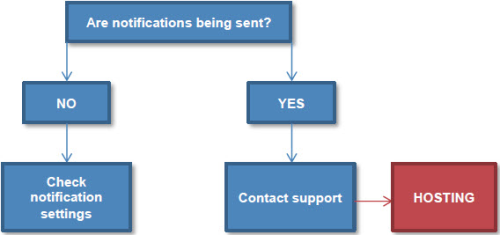
Sometimes engineers may tell you that they are not receiving notifications for work orders. There can be a number of reasons for this:
- If notifications are not being sent, you should check your notification settings
- If notifications are being sent, but are not being received by engineers, contact support
You can check whether notifications are being sent by viewing the Outbound page for a request.
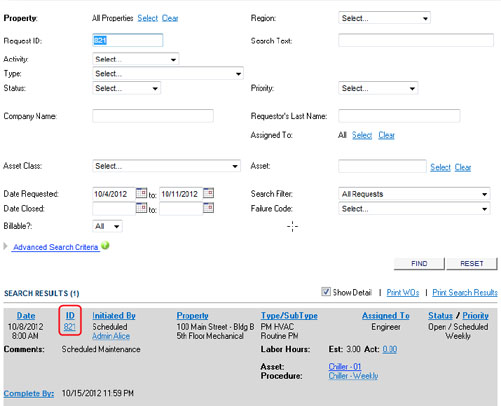
- Access the Logbook module by clicking the Logbook link at the top of the page.
- Select the Find Requests tab.
- Specify the appropriate search criteria to locate your request (Request ID is optimal).
-
Click the Request ID to open the Request Details page.
-
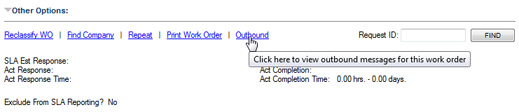
Scroll to the bottom of the page, expand the Other Options pane, and then click the Outbound link.
If you see that notifications are being sent, contact support so that they can escalate this issue to our hosting department.
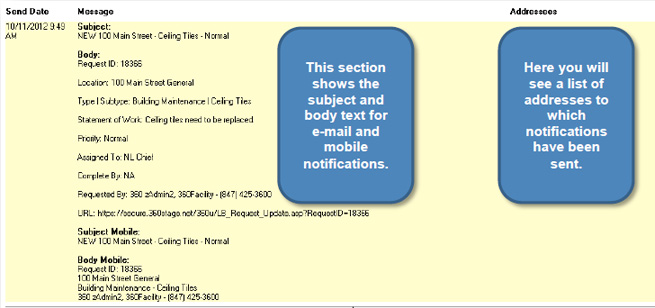
If, however, notifications are not being sent, then check your notification settings for these request types. For more information, see Troubleshooting Notifications.